Funnel Library in your AI
Research competitor funnels with AI
Connect Claude, ChatGPT or Cursor to the Funnel Library and ask in plain English. Your AI searches every landing page, the ads pointing at it, its versions and its A/B tests, and links you to each one.
What landing pages has Grüns launched this month, and what changed on them?
Show me quiz funnels in pet supplements with live A/B tests.
Which advertorials in skincare have run the longest, and what's their hook?
What changed this week across the brands I follow?
What you can ask
The library's unit is the landing page: every ad pointing at it, live and ended, how it changed over time, and the A/B tests running on it.
Find landing pages by type, category, topic or how long they've run. Quizzes, advertorials, listicles, offer pages.
"Find listicles in sleep with more than 20 live ads."
A brand's landing pages and ads, what it's testing, and how active it's been week by week.
"Which pages is this brand backing hardest right now?"
Every version of a page, what changed, the variants in a test, and each ad next to the page it sends people to.
"Tear down this page and how its headline changed."
Track brands in the United States or the country you sell in. See new pages, page changes, ad bursts and brands that went quiet. Ask us to add a brand we don't have.
"Write my weekly competitor brief."
Your AI reads a brand's ads with hooks, copy and transcripts, what it switched off, and the words its live ads use most.
"What are the main angles Grüns is pushing?"
Connect your AI
Point your AI app at https://funnels.dtcdailynews.com/mcp. You sign in with your DTC Daily email in the browser, so there are no keys to paste. Apps that can't sign in this way use a personal key from your account page.
Claude on the web and the desktop app (connectors you add on the web also work in Claude on your phone).
- Open Settings → Connectors and choose Add custom connector.
- Name it Funnel Library and paste https://funnels.dtcdailynews.com/mcp as the URL (nothing after mcp).
- Claude checks the server and shows its sign-in options. Leave the two it marks Detected: Sign in now and Use Claude's published identity. Don't add any headers. Click Add.
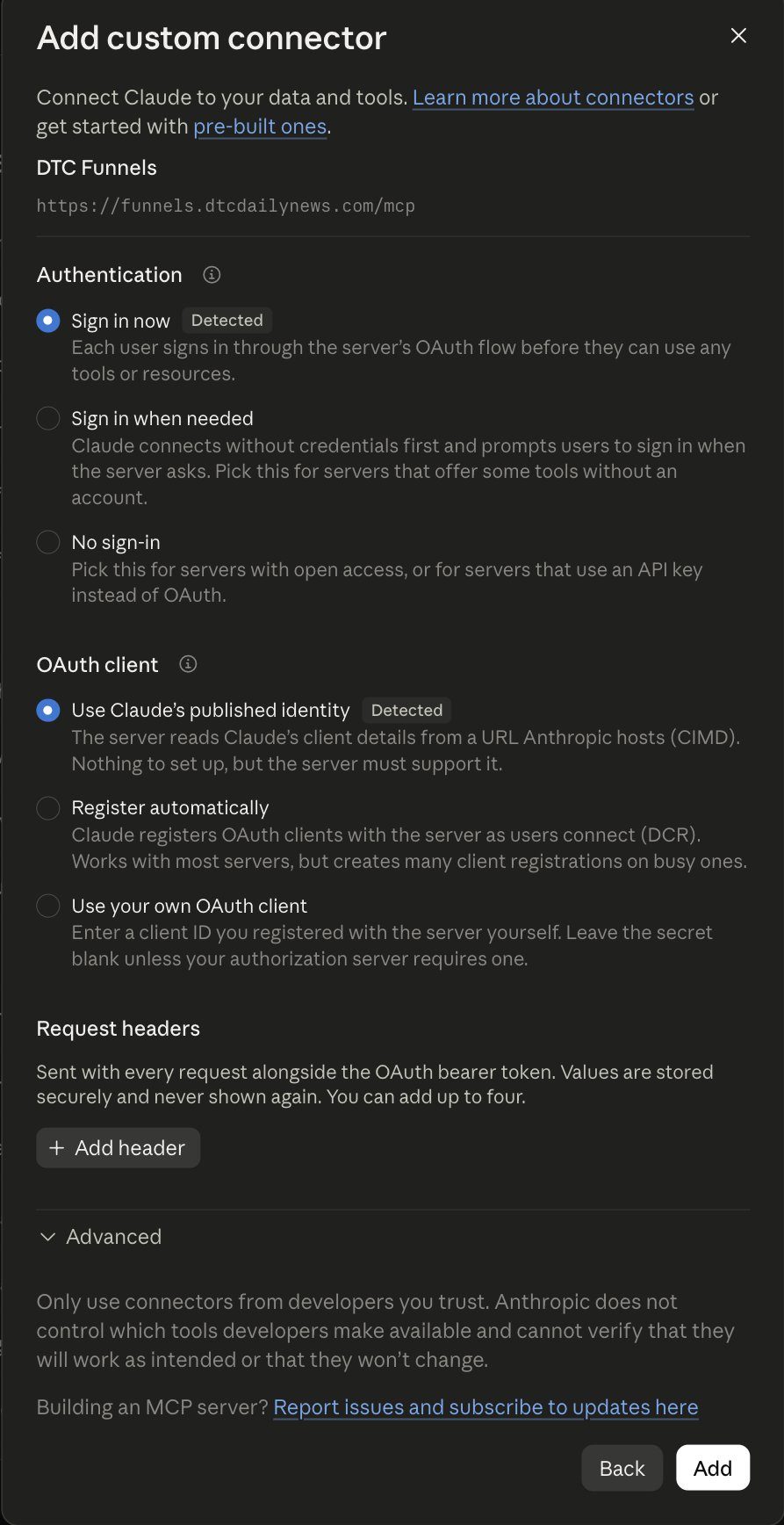
Leave the options Claude marks Detected, then click Add. - Click Connect. Sign in with your DTC Daily email and the 6-digit code we send you, then click Allow.
- In a chat, open the tools menu and make sure Funnel Library is switched on. Then ask away.
Run this in your terminal, then run /mcp inside Claude Code and choose funnel-library to sign in. Add -s user to use it in all your projects.
claude mcp add --transport http funnel-library https://funnels.dtcdailynews.com/mcp
Prefer a key (for scripts or a server with no browser)? Make one on your account page and add it as a header:
claude mcp add --transport http funnel-library https://funnels.dtcdailynews.com/mcp --header "Authorization: Bearer YOUR_KEY"
- In ChatGPT, open Settings → Apps & Connectors → Advanced settings and turn on Developer mode.
- Back in Apps & Connectors, click Create. Name it Funnel Library, paste https://funnels.dtcdailynews.com/mcp as the MCP server URL and choose OAuth for authentication.
- Sign in with your DTC Daily email and the code we send you, then click Allow.
- In a new chat, pick Funnel Library from the + menu and ask your question.
Make a personal key on your account page (it's shown once), then add this to ~/.cursor/mcp.json (or Settings → MCP → Add new MCP server):
{
"mcpServers": {
"funnel-library": {
"url": "https://funnels.dtcdailynews.com/mcp",
"headers": { "Authorization": "Bearer YOUR_KEY" }
}
}
}
VS Code: add this to .vscode/mcp.json in your project. VS Code opens the browser for you to sign in.
{
"servers": {
"funnel-library": { "type": "http", "url": "https://funnels.dtcdailynews.com/mcp" }
}
}
Windsurf: make a personal key on your account page, then add this to ~/.codeium/windsurf/mcp_config.json:
{
"mcpServers": {
"funnel-library": {
"serverUrl": "https://funnels.dtcdailynews.com/mcp",
"headers": { "Authorization": "Bearer YOUR_KEY" }
}
}
}
Keep your personal key private: anyone with it can use your lookups. You can replace it or switch it off on your account page at any time.
Add the Radar skills
13 skills that tell your AI how to read the data: a competitor overview, angles, hooks, killed ads, a weekly watch, landing page and script teardowns, and what to test next. In Claude Code:
claude plugin marketplace add the90skid/radar-skills
claude plugin install radar-skills@radar-skills
In other agents that support skills:
npx skills add the90skid/radar-skills
The tools your AI gets
Your AI picks from 33 tools itself. There are also five one-click prompts (set me up, a Monday competitor brief, what to test next, a brand's playbook, tear down a landing page) and a data dictionary it can read.
Discovery
search_brandsbrands by name, website or categorysearch_pageslanding pages by words, brand, category, type, funnel shape, A/B tests or a ranked listsearch_adsads by words, brand, format and date, or the opening lines of video ads across brandssearch/fetchsearch the library and open a result (ChatGPT deep research)
Brands
get_brandprofile, Radar summary, weekly activity and changesget_brand_adsits ads, grouped by creative, live and endedget_brand_pagesits landing pages, and the ones that moved this week
Pages and creatives
get_pageone page: ads, versions, A/B tests and timelineget_adone ad with its landing page, rank and transcriptshow_adthe creative as an image, with a watch link and a download linkshow_pagescreenshots of a landing page
Computed answers
top_adsa brand's proven ads, ads being tested and long-runnersad_moversads that climbed, fell, launched or were switched offcreative_teststests and their survivorspage_testswhat a brand did with its landing pagesget_briefa short brief on up to 10 brandsnext_testspatterns many brands back with proven adscategory_trendswhat's rising in a category
Bulk reads
export_adsone brand's ads with hooks and a short excerpt, about 70 a call (the whole copy and transcripts with fields full)competitor_overviewup to 10 brands in one callkilled_adswhat a brand switched off and how long each livedweekly_changeswhat changed this week at up to 10 brandscategory_top_adstop ads across a category's brandsbrand_wordsthe words and phrases a brand's live ads use most
Tracking
suggest_competitorslikely competitors, with the reason for eachlist_trackedthe brands you track, by folder and countrytrack_brandtrack a brand, in the United States or another countryfoldersfolders for your tracked brands, one per client
Boards
boardsyour saved pages and adssave_to_boardsave a page or an ad
Account and data
get_usagelookups left today and this monthdescribe_datawhat we cover and what the fields mean
Countries. The library is the ads Meta shows in the United States. You can also track a brand in the United Kingdom, Canada, Australia, India, Ireland, New Zealand, Germany, France, Netherlands, Spain or United Arab Emirates. Its live ads, ranks and shares are then for that country. Tracking other countries comes with DTC Daily Membership.
Limits, in plain words
- Pro includes 500 lookups a month, up to 50 a day. A lookup is opening one brand or one landing page.
- Opening the same brand or page again that month is free. So is digging into a page you opened: its ads, its versions, an ad next to the page.
- Searching is included: 100 searches a day.
- Tracking brands, boards, adding brands and checking your usage never use lookups.
- Answers that use a lookup show how many you have left. Lookups reset on the 1st of each month.
- DTC Daily Members can try it with 25 lookups, once.
- Everything in the DTC Daily Membership: the full library and AI Launch Codes
- The library in Claude, ChatGPT and Cursor: 500 lookups a month
- Add 10 brands a month to the library (Members add 3)
Already pay for the Membership through the newsletter? Pro is $30 a month on top.
Questions
Which plan do I need?
Pro. If you're a DTC Daily Member, you can try it first with 25 lookups: connect your AI and sign in.
What counts as a lookup?
Opening one brand or one landing page in detail. Opening it again in the same month is free, and so are a page's ads, versions and ad-to-page comparisons once you've opened it. Searches, tracking, boards and usage checks aren't lookups. Answers that come back empty don't count.
Do you see my chats?
No. Your AI app sends us only the tool it wants and what it's looking up, such as a brand name or a page. We keep a record of those requests to run the limits. We never see your conversation.
What can't it tell me?
Money spent, sales, conversions or revenue: nobody outside the brand has those. Impressions only as an estimate from Meta's display order. A page or ad that runs a long time is one the brand keeps backing.
Which AI apps work?
Claude (web, desktop and phone), Claude Code, ChatGPT, Cursor, VS Code, Windsurf, and any other app that connects to remote MCP servers.
Can I share my account or export the library?
No. Pro is for one person, and the limits are there to stop copying the library in bulk. Unusual patterns pause access until we've had a look.
How do I disconnect?
On your account page, under AI apps, click Disconnect next to the app. You can also switch off your personal key there.
Ready to connect?
It takes about a minute.